![teamecho-Logo-RZ-schwarz (1).png]](https://support.teamecho.com/hs-fs/hubfs/teamecho-Logo-RZ-schwarz%20(1).png?height=35&name=teamecho-Logo-RZ-schwarz%20(1).png)
Open communication is the foundation of a healthy company culture, yet some topics require a protected space. With the Direct Messages feature, organizations provide a low-threshold channel that allows employees to send targeted feedback, concerns, or insights directly to higher-level roles—without fear of any connection back to their identity.
Feature Overview
Activation & Dashboard
The feature is available as an optional module and can be activated organization-wide upon request. Once enabled, an additional Direct Messages box appears on the dashboard.
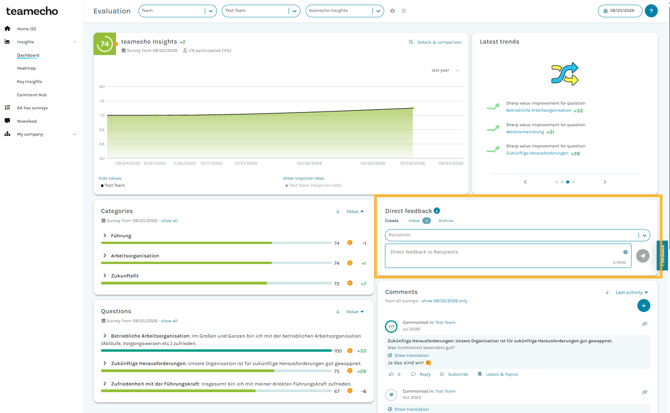
Targeted Recipient Selection
Using the dashboard box, users can select specific individuals from higher-level roles (e.g., team lead, department head, or superadmin—depending on the roles configured in the system).
- Exclusive Visibility: The sent message is visible solely to the selected person.
- One-Way Communication: Replying directly through the system is intentionally not possible. The channel serves purely for the confidential receipt of input and feedback.
teamecho Anonymity 😎
Here, too, anonymity is the top priority. User data and message content are stored strictly separately on the server. As soon as a message is sent, there is technically no longer any link between the sender and the content. Retroactive identification is impossible.
Notifications & Status Display
When a direct message is received, the system signals this in two places:
- Dashboard Indicator: A visual notification appears in the recipient's Direct Messages box (the counter changes to 1).
- Email Notification: Provided the recipient has enabled email notifications, they will also be informed of the incoming message via email.
Notifications regarding general activity and comments are batched and sent out at 00:00 (midnight) by default.